Sports team: training, matches and equipment: how to organize it with Tasks4Us

Coordinate a sports team with Tasks4Us: equipment, call-ups, match times, owners and confirmation photos in one shared task group.

When team logistics take more energy than the training

A small team has more tasks off the pitch than on it: bringing balls and bibs, confirming Saturday’s field, sending the call-up, bringing water, collecting kits and announcing every time change. Spread across several chats with families and players, something fails before every match and the coordinator ends up chasing confirmations.

Why it works with Tasks4Us

The coach or coordinator creates a task group and invites players, families and helpers. Each task says what to bring, who confirms it and what is still pending before the match. When someone prepares the equipment or confirms the field, they mark it and everyone else sees it without asking.

Clear information so players, parents and coordinators know what is still missing.

Visual categories

Use green for training, yellow for matches, red for urgent items and blue for equipment. Before a match, a quick look at yellow and red is enough.

Photos that confirm

Attach a photo of the prepared kit, the signed match sheet, the published schedule or the booked field. The picture confirms the task is really done.
Less friction for everyone

  • Fewer forgotten items before the match because equipment has a task and an owner.
  • Fewer doubts about who brings what thanks to visible owners.
  • Fewer times changed in three different chats because the date lives in the group.
  • Less equipment scattered without control because each item is marked when it is ready.

From scattered confirmations to a prepared team.

  1. Create a task group for the team.
  2. Add tasks per match or training session.
  3. Assign owners for equipment and communication.
  4. Use colors for urgency or task type.
  5. Mark items complete before each event so only what is missing remains.
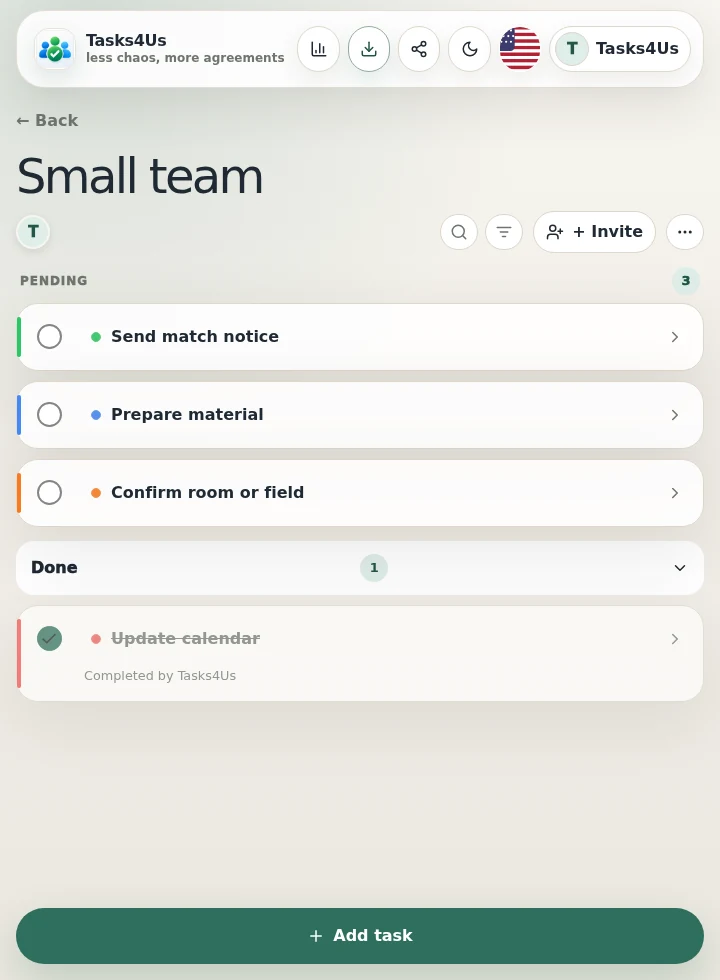
Real Tasks4Us example for Sports team: training, matches and equipment
Real Tasks4Us screenshot with pending and completed items separated.

What is this group for?

The team arrives prepared and the coordinator stops chasing confirmations one by one because everyone sees the same group.

Try it with my group

Other groups you can organize with Tasks4Us.

Shared wedding gift list

Create a shared wedding gift list so every guest can see what is still available, what has already been bought and leave a clear confirmation without flooding the chat.

Read example →

Family organization with kids, parents and grandparents

Organize the routine of a family with kids, parents and grandparents in Tasks4Us: colors per child, common and individual tasks, and photos so nothing is done twice.

Read example →

Shared flat: cleaning, shopping and common payments

Organize a shared flat with Tasks4Us: cleaning rotas, common shopping, payments and maintenance visible to every flatmate, without arguments.

Read example →