
Family organization with kids, parents and grandparents: how to organize it with Tasks4Us

Organize the routine of a family with kids, parents and grandparents in Tasks4Us: colors per child, common and individual tasks, and photos so nothing is done twice.

When family coordination starts living in scattered messages

When parents and grandparents share the childcare, coordination scatters across calls, voice notes and notes on the fridge. Two people buy the same poster board, nobody signs the field-trip permission slip and Friday’s snack is taken for granted until it is missing. In the end one person carries the memory of the whole family.

Why it works with Tasks4Us

In Tasks4Us the family creates one shared task group. Parents add tasks for everyone and tasks for each child; grandparents join as guests and see what is due today, what is already done and which child each item belongs to. When someone completes a task, it leaves the pending list and the others stop asking.

Clear information so every helper knows what is missing and what is already done.

Visual categories

Give each child a color (red for one child, blue for the other) and use other colors for home and school. Grandparents can tell at a glance what belongs to whom without reading every task.

Photos that confirm

Attach a photo of the signed permission slip, the prescription, the school supplies list or the shopping already done. The picture closes the task without confirming it in the chat.
Less friction for everyone

  • Fewer repeated purchases between parents and grandparents because each task is marked as soon as it is done.
  • Fewer forgotten kids’ activities because pending items always stay at the top.
  • Less confusion between siblings thanks to each child’s color.
  • Fewer WhatsApp reminders because everyone sees the same updated group.

From scattered reminders to a visible family routine.

  1. Create a “Family” task group.
  2. Invite grandparents and anyone who helps with the kids.
  3. Give each child a color and each task type another.
  4. Assign an owner when someone specific should do it.
  5. Check pending items at the top and keep completed ones folded away.
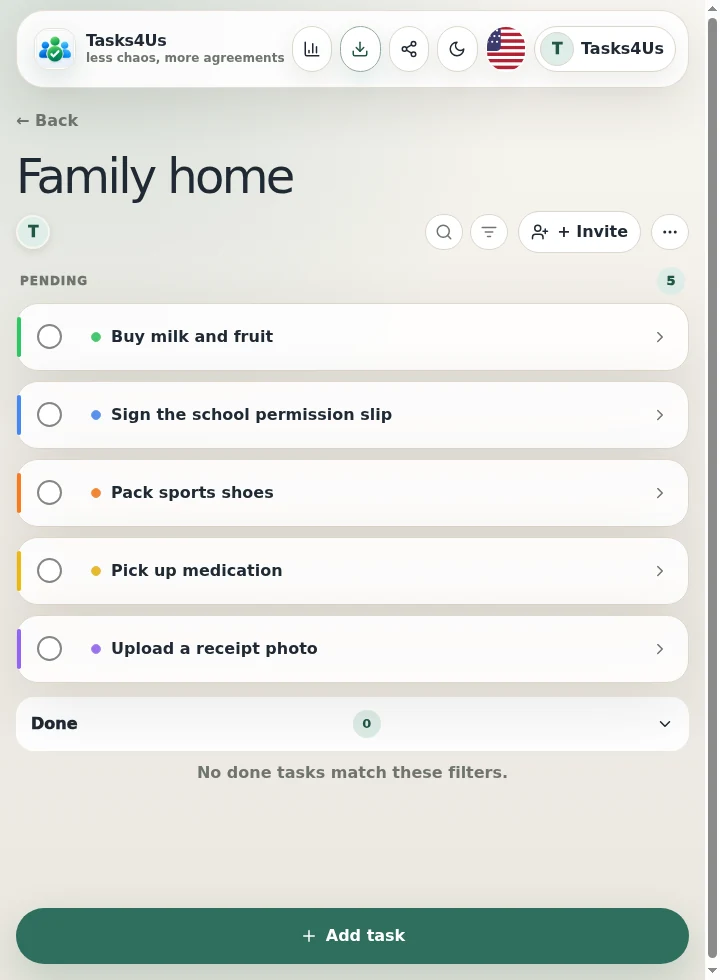
Real Tasks4Us example for Family organization with kids, parents and grandparents
Real Tasks4Us screenshot with pending and completed items separated.

What is this group for?

Everyone knows what to do without asking, duplicates disappear and the family runs on a calmer, better shared routine.

Try it with my group

Other groups you can organize with Tasks4Us.

Shared wedding gift list

Create a shared wedding gift list so every guest can see what is still available, what has already been bought and leave a clear confirmation without flooding the chat.

Read example →

Shared flat: cleaning, shopping and common payments

Organize a shared flat with Tasks4Us: cleaning rotas, common shopping, payments and maintenance visible to every flatmate, without arguments.

Read example →

Sports team: training, matches and equipment

Coordinate a sports team with Tasks4Us: equipment, call-ups, match times, owners and confirmation photos in one shared task group.

Read example →