
Family care for an elderly person: how to organize it with Tasks4Us

Coordinate the care of an elderly person with Tasks4Us: medication, medical appointments, shopping, visits and photos of prescriptions or receipts shared with the family.

When family care depends on memory and private messages

When several people take turns caring for an elderly relative, coordination becomes delicate: a medical appointment is forgotten, two siblings buy the same medication, nobody knows whether someone already called to book a slot and the mental load ends up on whoever lives closest.

Why it works with Tasks4Us

The family creates a private task group to share the support: health, shopping, appointments and accompaniment. Everyone sees what is still pending that week and what has already been done. Photos record prescriptions, purchases or instructions without exposing sensitive information.

Clear information so every helper knows what has already been handled.

Visual categories

Use red for health, yellow for shopping, blue for appointments and green for visits. Anyone opening the group sees at once whether something medical is pending.

Photos that confirm

Attach a photo of the prescription, the pharmacy receipt, the report or the note with practical instructions. Avoid sensitive clinical data: the picture is there to confirm, not to archive medical records.
Less friction for everyone

  • Fewer forgotten appointments because each one has an owner and a visible date.
  • Fewer repeated purchases because medication already bought is marked.
  • A clearer record of what was done and when thanks to the history of completed tasks.
  • Less mental load on one person because the split is visible to the whole family.

From isolated reminders to coordinated family care.

  1. Create a family care task group.
  2. Add tasks by health, shopping, appointment or accompaniment.
  3. Assign owners by day or by week.
  4. Attach images when they help confirm something is done.
  5. Review completed tasks without losing the history.
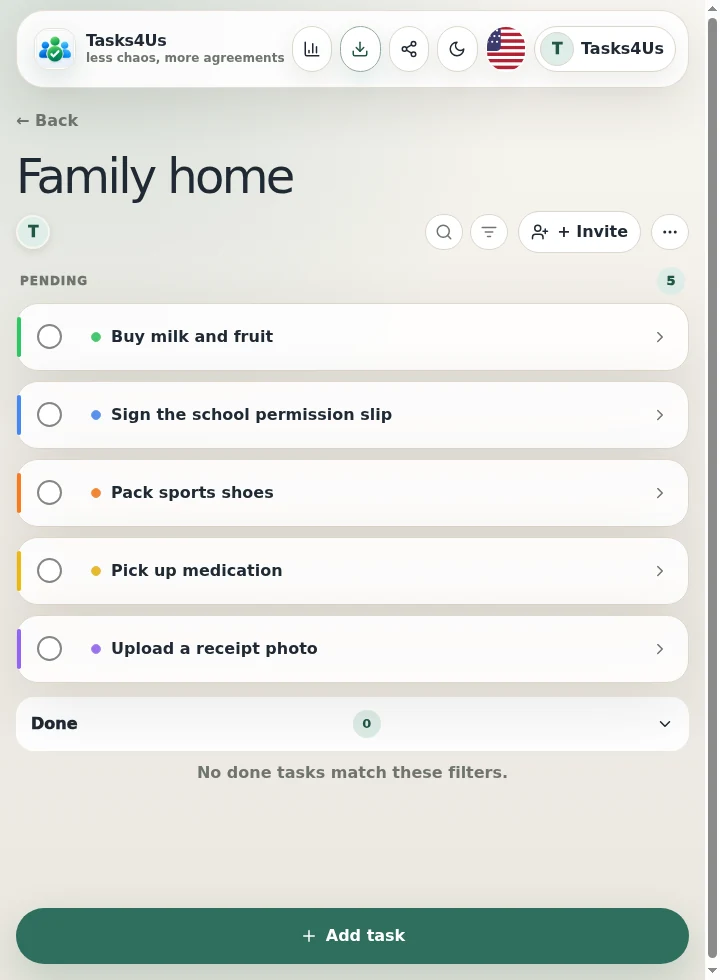
Real Tasks4Us example for Family care for an elderly person
Real Tasks4Us screenshot with pending and completed items separated.

What is this group for?

The family shares the load better, reduces forgotten care tasks and everyone knows what to do without having to ask.

Try it with my group

Other groups you can organize with Tasks4Us.

Shared wedding gift list

Create a shared wedding gift list so every guest can see what is still available, what has already been bought and leave a clear confirmation without flooding the chat.

Read example →

Family organization with kids, parents and grandparents

Organize the routine of a family with kids, parents and grandparents in Tasks4Us: colors per child, common and individual tasks, and photos so nothing is done twice.

Read example →

Shared flat: cleaning, shopping and common payments

Organize a shared flat with Tasks4Us: cleaning rotas, common shopping, payments and maintenance visible to every flatmate, without arguments.

Read example →